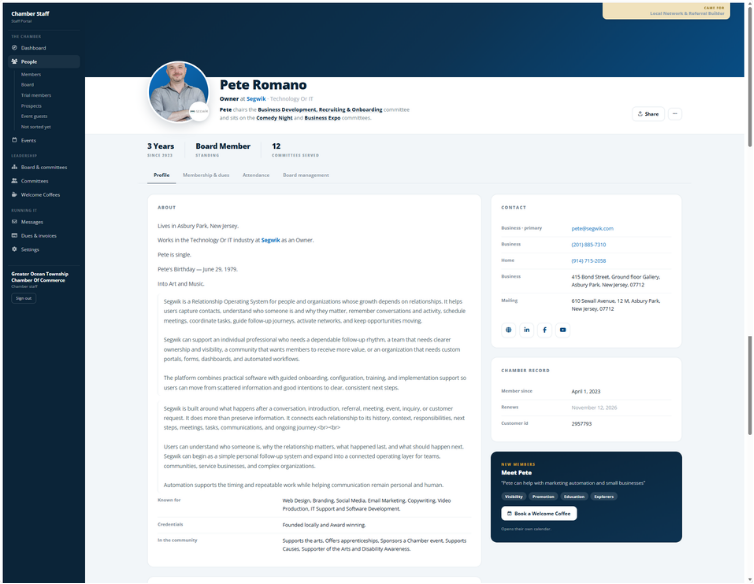
Segwik — Chamber Walkthrough
Sarah ChenChen ArchitectureJoined to build relationships with local developers
MembershipActive Member
IntroductionTom Reynolds
EventBusiness Breakfast
Member RequestPermitting Connection
CommitteeEconomic Development
Next StepCheck In Thursday
One member · the work around them · the history connecting it
Segwik for Chambers

Now See What It Looks Like When the Chamber Is Connected.

MembersCompaniesDuesEventsMeetingsCommittees RequestsIntroductionsFollow-upRelationship history

Not as separate pieces of Chamber activity — as one connected operating system built around the people your Chamber serves.

Sarah ChenChen Architecture

Joined to build relationships with local developers

Relationship history · 6 entries
MembershipActive MemberCompany and member relationship connected
IntroductionTom ReynoldsCommercial developer · relevant connection
EventBusiness BreakfastRegistered · participated
Member RequestPermitting ConnectionRouted · follow-up visible
CommitteeEconomic DevelopmentParticipation connected to member
Next StepCheck In ThursdayOwner: Chamber staff
One member · the work around them · the relationship history connecting it
Start with one member

Sarah Joins the Chamber. Now Watch What Happens Around Her.

This is an illustrative journey, but the point is practical: the things a Chamber does for a member can remain connected to the relationship instead of becoming separate pieces of activity.

Sarah ChenChen Architecture
Active
Member

Sarah Chen · Chen Architecture

Why did you join?

“I want to build relationships with local developers and commercial property owners.”

Relevant connections
Tom ReynoldsCommercial developer · relevant to Sarah's stated interest in developer relationships
Dana WhitfieldCommercial property owner · relevant to Sarah's membership goal
Sarah · next steps
Introduce Sarah to Tom ReynoldsMary
Check in after introductionThursday
Review additional relevant connectionsStaff
Upcoming activity
18Sep
Business Breakfast
Sarah Chen · Registered
Ask the Chamber

“I'm looking for someone familiar with municipal permitting for a commercial project.”

Request ReceivedAssignedFollow-Up Visible
What happened

Introductions · participation · member request · follow-up

What should happen next

Check in on connections and identify the next useful step

Relationship context · step 1 of 6
Now switch perspectives

Two views of the same Thursday.

Sarah sees a Chamber that knows her. Staff need something different: a clear view of the work happening across hundreds or thousands of relationships.

What Sarah seesThe same momentWhat staff see
"Tom Reynolds, commercial developer. Mary is checking in Thursday."
01Introduction
Sarah Chen · check in after developer introduction · owner Mary · due Thursday
"My permitting question is with someone. I can see it's being handled."
02Member request
11 requests in motion · permitting connection assigned, awaiting response
"I'm registered for the Business Breakfast on the 18th."
03Event
24 new members in their first 90 days · three still need a first connection owner
The Staff Operating View

This Isn't Just a Better Member Record. It's a Way to Run the Work.

Staff need to see what needs attention, who owns it, where members are in their journey, and what is happening across the Chamber.

Chamber Operating ViewIllustrative staff view
People · Work · Follow-Up · Relationships
0New Members in First 90 DaysIllustrative
0Member Requests in MotionIllustrative
0Introductions to Follow UpIllustrative
0Upcoming MeetingsIllustrative
Relationships Requiring Attention
Sarah Chen · Chen ArchitectureCheck in after developer introduction
Follow Up
She joined to build developer relationships, was introduced to Tom Reynolds, and Mary owns Thursday's check-in.
New Member JourneyFirst connection still needs an owner
Attention
Members who joined this month with no first connection recorded yet.
Member RequestLocal service provider introduction requested
Assigned
Routed to a staff member, follow-up visible, connected to that member's history.
Board Liaison Check-InNew member relationship due for review
Upcoming
Board liaisons review new member relationships on a set rhythm.
Chamber Activity
Business BreakfastUpcoming registrations
Event
Registrations attach to each member's record, including Sarah's.
Economic DevelopmentCommittee meeting
Meeting
Participation connects to the members who took part.
Member Follow-UpStaff tasks due this week
Tasks
Every task carries an owner and the relationship it belongs to.
The Chamber operating system

Every part of the work feeds the same record.

Pick any piece of Chamber work and see what it leaves behind on the relationship.

01

Members & companies

People and the organizations they represent, connected.

02

Dues & payments

Membership activity connected to the member.

03

Events & registrations

Participation stays part of the member story.

04

Meetings & committees

People, participation and work around Chamber groups.

05

Member requests

A clear path to ask, and a visible response.

06

Communications

Relevant communication connected to the people it's for.

07

Tasks & follow-up

Ownership and next steps, visible across the team.

08

Member portal

A place for members to take part in the Chamber.

On the record Sarah's company, dues and membership stay on her record.
Two Ways to Run It

You Don't Have to Replatform to Work This Way.

Everything you just watched — the introduction, the request, the follow-up landing on one record — can run beside the system your Chamber already uses. Or it can be the system.

Add it alongside

Engagement Maximizer

Your dues, events and directory stay where they are. Segwik runs the engagement layer: the member record, the introductions, the requests and who owns what happens next.

  • ✓No replatforming and no migration project
  • ✓The staff operating view you just saw
  • ✓Relationship history on every member
  • ✓Your team keeps the tools it already knows

Best when the back office is fine and the relationship work is what disappears.

Everything in one place Or move it all

Full Chamber Maximizer

Run the whole Chamber on Segwik, so the work and the relationship record are the same system rather than two that have to be kept in step.

  • ✓Dues, invoices, payments and renewals
  • ✓Events, registration and attendance
  • ✓Member and staff portals
  • ✓One system, one record, one bill

Best when the current stack is several tools that don't talk to each other.

Either way, you start with engagement. Replatforming is a choice, not a requirement.

01 Something happens a member joins, asks or attends
What changes

The work feeds the relationship instead of disappearing around it.

01

Something happens

A member joins, registers, asks, meets, participates or pays.

02

Context builds

The Chamber learns more about the person and their needs.

03

The next step gets clearer

Someone can see what should happen and who owns it.

04

The Chamber remembers

The next conversation builds on what happened.

Keep going How much of your Chamber lives in someone's head?

The same question, asked about your own Chamber: what only one person knows, and what happens when they are not there.

Find out
The Chamber walkthrough

Don't sit through a generic software demo.

Show us how your Chamber actually works, and we'll show you what those same relationships and workflows could look like with Segwik behind them.

What we'll look at togetherTick what's hardest at your Chamber
✓How someone becomes a member
✓What happens during the first 90 days
✓How your team handles requests and introductions
✓How events, meetings and committees fit in
✓Where follow-up currently lives
✓What your staff has to remember manually
✓What your team would want to see in one place
Then that's where we'll start
    Schedule a Chamber walkthrough

    A practical conversation about your Chamber, your members, and the way your team actually works.